 RevealStudio
Your holiday film. Cut to the beat. In minutes.
Drag in photos and videos, pick music, press play: RevealStudio cuts the film on every beat automatically – with chapters per travel day, a route map and ready-made styles. Everything runs in your browser, nothing is uploaded.
Free, no account, no watermark. Runs in Chrome and Edge on the desktop, Chrome on Android and Safari on the iPhone.

A film in three steps
No editing suite, no timeline, nothing to learn. The music sets the pace, RevealStudio places the cuts.
Add media
Photos and videos from your computer or phone. Faces, sharpness, motion and speech are analysed locally; duplicates and blurred shots can be thinned out.
Pick a style and music
Five modern styles from calm to fast. Music from the built-in, licence-free library or your own tracks – the cut follows the beat.
Watch and save
The preview follows every change instantly. Save as MP4 up to 4K, as a compact file for messengers or portrait for the phone.
Five styles, one click
Every style brings its rhythm, transitions, colour grade and a matching track. Fine controls exist, but you will not need them.
Kinetic
Moving picture panels, cuts on every beat, light accents – the classic for everything.
Travel
Every chapter starts calm and picks up speed, warm colours, route map on the chapter cards.
Cinema
Widescreen with letterbox, long dissolves, light leaks – for drone shots and sunsets.
Reel
Portrait, 30 seconds, one or two beats per picture, zoom punches on the downbeat.
Plain and simple
Just your pictures, hard cuts or dissolves – nothing distracts.

- Presets Calm for landscapes, Energetic for action and kids – one click sets tempo and cut density.
- Reshuffle effects The same film, a different sequence of transitions.
- Colour Saturation, colour effects such as Sunset or Teal & Orange, your own font for titles.
- Save styles Keep your own variants and reuse them in every project.
Made for travel films
RevealStudio reads capture time and place from your photos and builds the story from them – without you sorting anything.

- Travel chapters One chapter per day or change of place, with a title card "Day 3 · Amalfi" and a place-and-date overlay.
- Route map The route between the chapter places on every chapter card, offline from a bundled city table.
- Travel animation A car, train, plane or ship travels across a map to the next destination, optionally with flag and globe opening.
- Thin out Series of near-identical photos down to the best one, blurred and dark shots out – one click, one undo step.
- Protect speech Spoken passages in videos stay whole, the sound comes up, the music steps back.
- Music per chapter A different track from day three on? Assign it, done.
On the phone: five steps, one clip
The quick mode leads from photo to finished clip – media, style, music, format, film. Share straight from the browser.


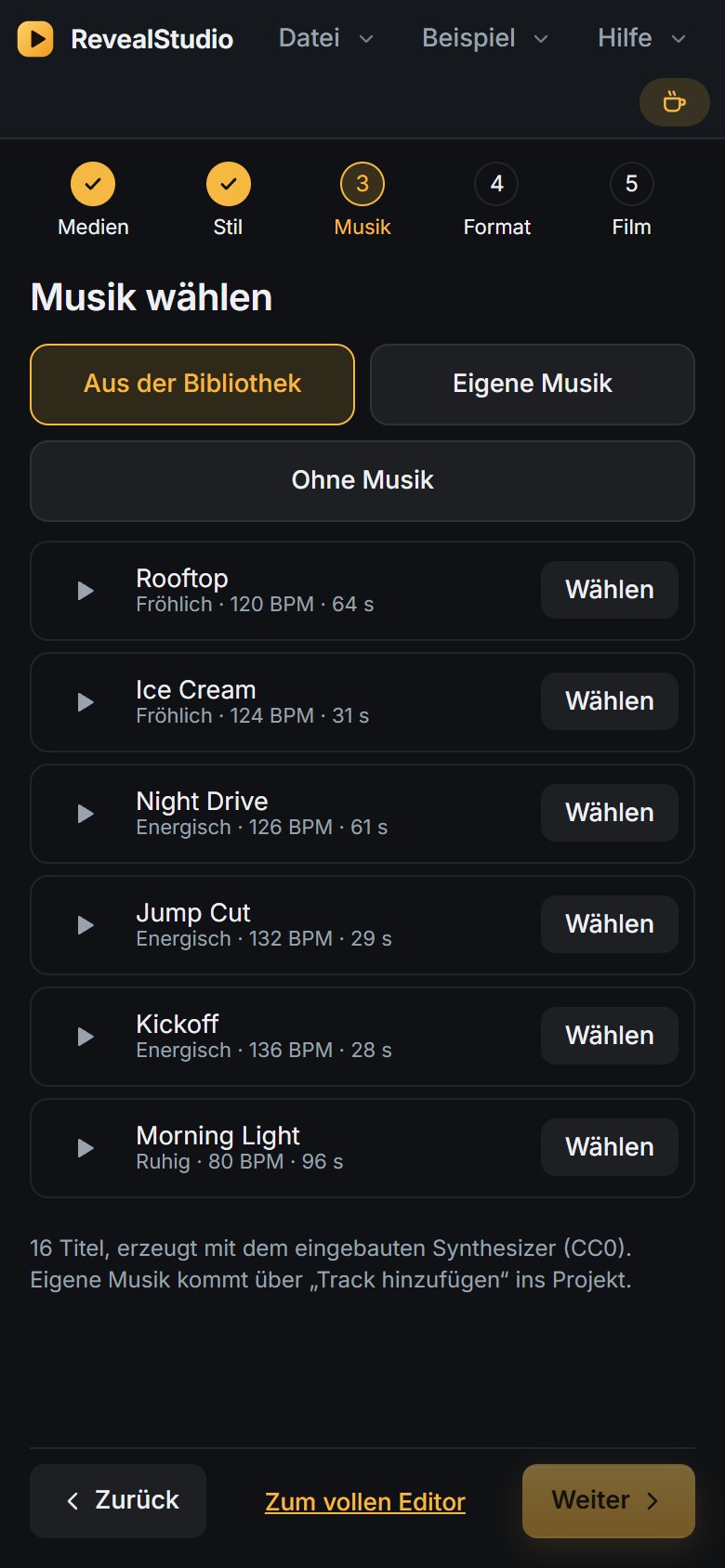

Screenshots show the German interface; the app switches to English with your browser language or in the settings.
Music that costs nothing
RevealStudio generates sixteen licence-free tracks right in the browser – calm, happy, energetic, cinematic or on the road. Or use your own music: the beat is detected and the cuts land on it.
- Preview and take without a download, without attribution.
- Your own tracks MP3, M4A, WAV, FLAC – beat detection included.
- Voice-over Speak a commentary over the running film through the microphone.

Your pictures stay with you
RevealStudio is a web app without server-side processing: analysis, editing, preview and export run on your device (WebGPU, WebGL2, WebCodecs). There is no account, no upload and no advertising. Once loaded, the app also works offline and can be installed like an app.
RevealStudio is free and stays free. Hosting and the domain cost the operator money every month – if you like, buy a coffee. No strings attached, no account.
Buy me a coffeeFrequently asked questions
Which browsers and devices?
On the desktop a current Chrome or Edge (Firefox without hardware export). Chrome on Android, a current Safari on the iPhone. On phones the quick mode starts automatically.
Are my photos uploaded?
No. Everything stays in your device's browser storage. Only if you use the AI director with your own API key do text metadata go to the provider you chose – small thumbnails only if you switch that on explicitly in the AI settings.
What does it cost?
Nothing. No trial, no watermark, no subscription. If you like, support the hosting with a donation.
Which export formats?
MP4 with H.264 or H.265, 720p to 4K, 30 or 60 fps, aspect 16:9, 4:3, 9:16 or 1:1, plus the compact variant under 16 MB for messengers.
Where does the music come from?
The library generates its tracks in the browser; they are free to use. Your own music remains your business – its licences apply when you publish.
What is the AI director?
An optional assistant: you describe the film you want ("two minutes, calm beginning, the kids at the beach") and the director carries it out with the app's tools. It needs your own key from Anthropic or OpenAI, or a local Ollama server.